Tuesday, 19 January 2010

Reflexive Design-Tunnel Design

Looking further through youtube for ideas and inspiration i found this video. Reminded me a  little bit of a  journey from a dreamworld. Got me thinking maybe i could include this sort of idea into my video.


Tunnel/Pipe Tutorial.

Here is how I created the tunnel using Blender.

Delete the cube from your work area.
Press space, select ADD, CURVE and then BEZIER CURVE.


Next select "Edit Mode" from the menu at the bottom of the page. Right-click on the yellow dots to modify your curve and left click once you are happy with your shape.


Deselect your curve (hold Shift and right-click object) and select object menu from the menu at the bottom. Press space once again and selectADD, CURVE and then BEZIER CIRCLE. Then press "S" to shrink the circle down.

Change the object label of the circle to "X".


Then select the curve and change Bevel Object Label to "X" and press enter.

You should now have a tube. Click on the two spheres on the lower toolbar and select "ADD NEW".

Then select the animal print square button (Texture) and select"ADD NEW".
That should bring you to this screen. select "TEXTURE TYPE" and then "CLOUDS" then there will be a "COLOR" button on the right, select that.


Then click back on the spheres, and select the shaded option shown by the red arrow.
Your tunnel should now be multi-coloured.


Now to get the camera through your newly created tunnel. Right-click on the camera then hold Shift and right-click on the tunnel. make sure your mouse is in the workspace area and press CTRL+P. select "FOLLOW PATH" from the drop down menu. Select camera view. press ALT+A you now have an animation of your camera moving through the tunnel.

To slow the animation down, Go back into the object menus and increase the path length.


Here is my completed tunnel animation. Using the follow path parent technique the camera follows the tunnel withough the hassle of keyframing. In after effects i added  a solid green circle with a translusent outline to soften the edges of the tunnels exit and keyed in position and scale so it moved when the exit of the tunnel moved. I will key out the green at the end of the tunnel and replace with the cloud simulation.

1 - Reflexive Design - Re-presenting Reality

 #bdat
Brief.
"Produce a short film for the IVT, which encapsulates an interpretation, or explores an aspect of perception and representation. We have primarily focused on visual perception, but you are welcome to consider all elements within the perceptual field. Through the lecture series you should develop an understanding of theoretical foundations of perceptual development and capacity - particularly those relating to the embodiment in perception: biological, physical, cultural, social, and environmental factors, which are active in visual processes."

IVT- Immersive Vision Theatre was origionally a Planetarium (built in 1967),  it has now been developed into a 40 seat Immersive Vision Theatre (IVT). It is an instrument for displaying imaginary worlds in an immersive environment. The dome uses a fish eye lense to wrap video round the edges of the domes surface to create the visual capability of filling your whole perceptive view with the visualisations created and projected. When your whole perception is taken over with these videos you become part of its world, the visualisation becomes your environment.


Here an example of a video created for Domefest 2008. This video uses vibrant colouration on a black background, creating a very effective visualisation. This video is called Liquid / Light / Flow


I am quite the dreamer so for my IVT video i wanted to create something based on a dream, or dreams. weither it is a collective of dreams i have had or dreams others have had or a dream i have had i am not yet sure. but of course in order to get into my dream world i would need to fall asleep... so first step is the sleping animation.

This is the eye i created in order to create the falling assleep effect, i have coloured the two sections differently in order to show the two parts.the idea is, the domes contain the camera, the camera looks out through the gap. the eye will close partially, then open a little, then close  a little more, then open a little then close completely.simulating a gradual fall to sleep over around 7 seconds. during which i will show the title of my piece.

Bellow: this is a clip of what the outcome is from blender, i will now need to put it through aftereffects, greenscreen in an image of my room from the view of my bed, and add some motion blurr.
Here are the keyframes i used to create the blurr  effect.
Here is the intro to the video without the title sequence


Wednesday, 16 December 2009

6- Workspaces 2 3D Environments

I decided the only way to properly look at the environments at home would be to recreate them in 3D. plus it also gives me an idea of areas we can project on.

this is the area behind C103, using grungy lighting to give an idea of what it would be at night.


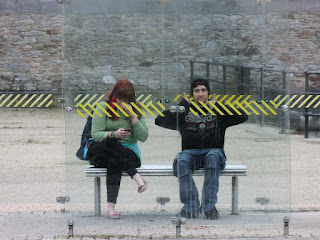
Here is the bus stop at Cremyll street, using parcially transparent planes i created the glass panels. a glass environment created for the shelter of its inhabitants.

Wednesday, 9 December 2009

6- Workspaces 2 Further Study of Location

Looking at my images of the bus stop at Cremyll street, i saw that the diagonal bars on the bus stop, which i later over layered in white in my projection simulation images, seemed to censor out parts of the people who were sat at there. this go me thinking into how this would look with black censor bars and how censor ship is used.
Then Looking at my second site, the back of C103 i wanted to brighten the place up, so i found a mural on google search and covered the walls of C103 in it. i think if it was tidier it would look a lot better.


My next attempt to improve the appearance of C103 was to come up with a video gradually taking away the parts which make it look so run down. Trying to make it look a little bit more inviting. its still looking a bit dull and grey but its an improvement.

Tuesday, 24 November 2009

5- Workspaces 2 Location Location Location

Choosing a location had to be dependant on the ability to project effictilvely within the area aswell as it being within Stonehouse itself.

The first location i was looking at was Cremyll street, which is towards the south of Stonehouse. I chose this area because they contain glass bus shelters, which i think would be a really interesting surface to project onto. They are also their own small environments, places where people go to excape the weither or sit while waiting for a bus. this relates the the origional dome idea, the idea of an environment, this is a more real and solid environment however even if the walls are glass and transparent, unlike the invisible or 100% transparent (physically nonexistant) walls.


The progection i would havto project on would have to be just as understandable when viewed in reverse because i would like the projection to also work like a tv screen to the people in the bus shelter. There is an issue with this however if i project head on , then people in the seats wouldnt be able to see much as the light from the projector would shine in their eyes. also the nature of the transparent surface would meen some of the image would transfer through to the back of the bus shelter.


Here is an example image which im going to use to show how i think the projection would work. usint contrasting geometric shapes and colours to make it show up.


Here is my visualisation of the projection on the chosen surface and how people would look when sitting within the shelter. I have darkened the origional image to simulate night, which would be the conditions in which we would have to project in order for the projections to show up.


The second and more visually solid place i have looked at for a projection site is at the back of C103 a popular club in the heart of Union Street. The site is visible from the smoking area of the club and at night is buzzing with activity so we wouldnt have a problem with finding people to see it.


Below: is a panoramic image of the are behind C103, showing great potential for projecting video. its a very dirty and grimy area of stonehouse. Getting darker quicker then other areas because its surrounded by buildings not allowing a lot of light in.


www.oneforthedesigners.co.uk/c103area.jpg


for larger image


This image shows 3 possible positions for the projection to take place, my favourite being where the stairs are located. as this creates a challenge to use this 3D surface to its full potential. it is also in a man made alcove surrounded on 5 of its six sides making it sheltered aswell as dark. The curved walls on the other two sides make the other surfaceses uite interesting visually, plus they also have a different texture to the rest of the walls as they are bocked in windows. blocked in by rough breeze blocks creating a geometric textured surface in itself.


www.oneforthedesigners.co.uk/c103projected.jpg
for larger image

This is my graphical light study of the alleyway. for the best view click on the link for the image to be enlarged. the area i was planning on projecting was the section on the left where there is mainly black with a batch of white. this would be the best area as we would have less area for the light to be dispursed. the area on the right which is drker is the back of C103 where the smoking area is whis is facing the area where im hoping to project our groups final outcome. This image really brings out the grungy nature of the alleyway in a cortoon esque form, the dark corners and sections making it seem eerie yet mysterious. what could be lurking round the corner? it also shows how naked and bare the area is when people arent present, i think if i were to recreate this image on a wednesday night it would tell a completely different story.

www.oneforthedesigners.co.uk/c103cartoongrunge.jpg

for larger image

Tuesday, 10 November 2009

4- Workspaces 2 Wi-fi Environments

This was Toyota's marketing technique for the launch of the 3rd generation Prius Hybrid in 2010. They were first brought to Boston but have now moved to major cities across the USA. Working on the idea their new Prius offers virtually everything you need in a car, "advanced technology, extra power, space, safety and 50 miles per gallon – all while providing what nature craves most: fewer smog-forming emissions." with there theme “Harmony between Man, Nature and Machine.” So there campaign was to visualise and present this in an idea which the public could see and relate to. So they created these 18 foot high solar panel daisies with free wi-fi connectivity ,power and enough comfortable seating for 10 people. visualisation of nature, using environmentally friendly energy providing a free service which anyone can use. They not only brighten up the environment visually but give you the idea of clean technology. well...“Harmony between Man, Nature and Machine.”
In the design you can see that the solar panels have been placed behind the petals and around the upper stem making the most of the organic spanning of the flower. the leaves have been used to advertise there product and add to the message which they are trying to show. you can see the erganomic design of the seating area which is in a natural green. The power sockets are based around the edges of the seating area. These environmentally friendly communication ports are a truely creative way of getting a concept of a car accross to the public.

Sunday, 8 November 2009

3- Workspaces 2 Postcard

Here is my submission for the Stonehouse postcard. based on my previous ideas of the wi-fi biodomes i placed them in position where a row of terrace houses would be, this is how i imagine the domes to look as a visual space.